Airboss
Overview
Section titled “Overview”Airboss is the system that turns DCS carrier operations from a landing strip that happens to float into an actual naval aviation environment. Out of the box, DCS gives you a carrier, an LSO voice, and a basic grade, but the core game is missing most of what makes carrier work feel real and trainable. There is no proper case recovery structure, no marshal stack management, no persistent grading history, no greenieboard, and no reliable way to run the comms and patterns the way a real air wing does. Airboss fills all of those gaps.
In practice, Airboss handles marshal and radio check-ins, sequences aircraft into the pattern, runs the LSO grading with real pass/wave-off/bolter logic, tracks every trap you fly, and feeds a persistent greenieboard with your passes, board rate and average grade. It also gives you weather reporting, recovery window scheduling, and Trick or Treat (S-3B Viking recovery tanker) that keep a busy deck moving. Lets break down each system one-by-one:
USS Harry S. Truman (CVN-75)
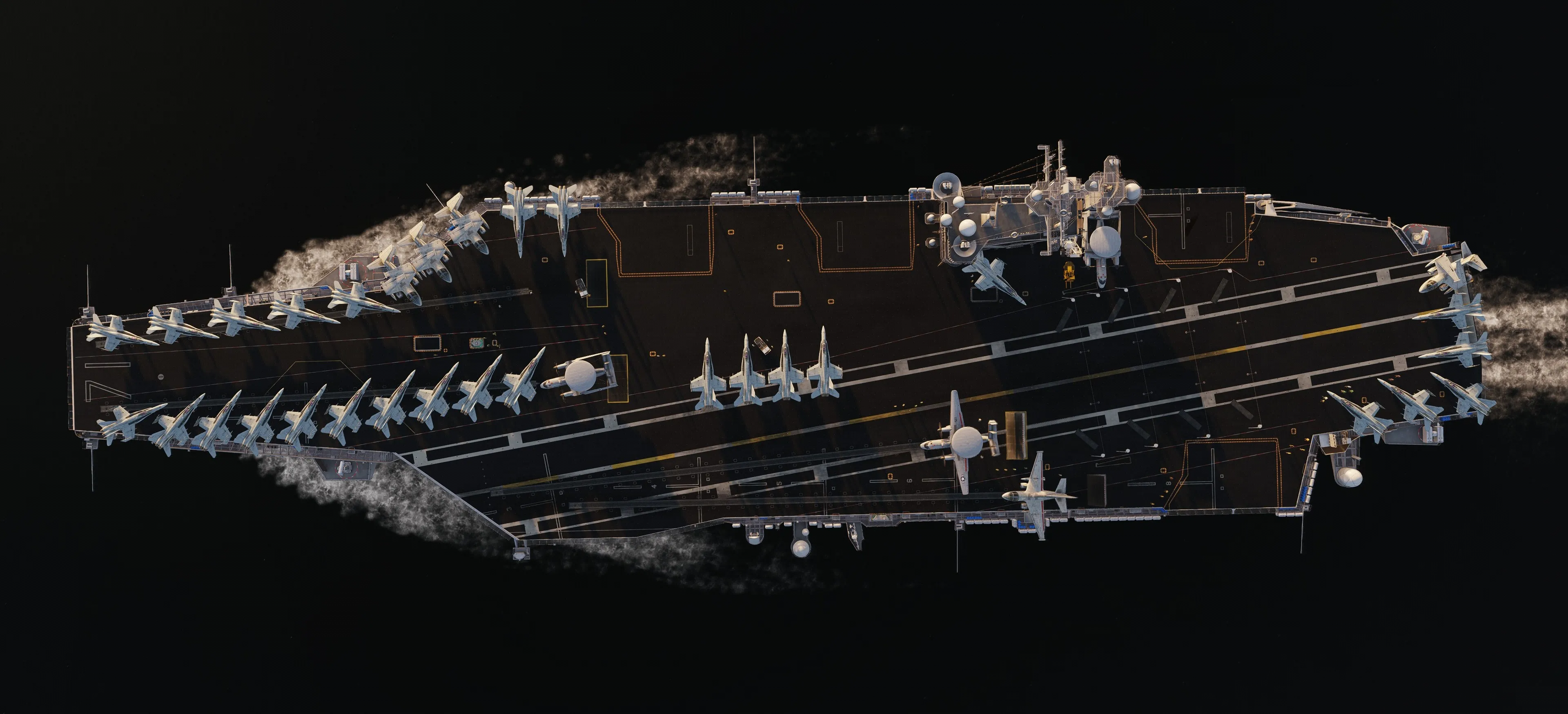
Section titled “USS Harry S. Truman (CVN-75)”The Truman “Lone Warrior” is the home of CVW-1, the virtual airwing that hosts Panther Den. The TACAN, ICLS, Tower, Deck, Paddles/Marshal frequencies are all published in the kneeboard comms cards. It should also go without saying any players found attempting to land non-navy aircraft(s) without tailhooks will face our moderation team. To learn more about virtual CVW-1, check out our homepage at cvw1.gg
Weather Report
Section titled “Weather Report”Airboss gives you an on-demand weather report referenced to the carrier, and you should treat it as a required part of your pre-recovery routine, not an optional nicety. It is pulled straight from the mission environment, so it is accurate for the exact conditions you are flying in. The conditions at the boat are rarely the same as feet dry over land or the reported server METAR for RealWeather.
The report gives you the numbers that drive which case you fly and how you set up: wind direction and speed, the resulting BRC and final bearing (the “wind correction” that decides your groove lineup), cloud base and visibility (which determine whether it is a Case I, II, or III), altimeter setting (QNH), and temperature. Cloud base and visibility are also deciding factors: a high overcast and good visibility is a Case I day, marginal conditions push it to Case II, and low ceilings, poor visibility, or night make it Case III.
Case I
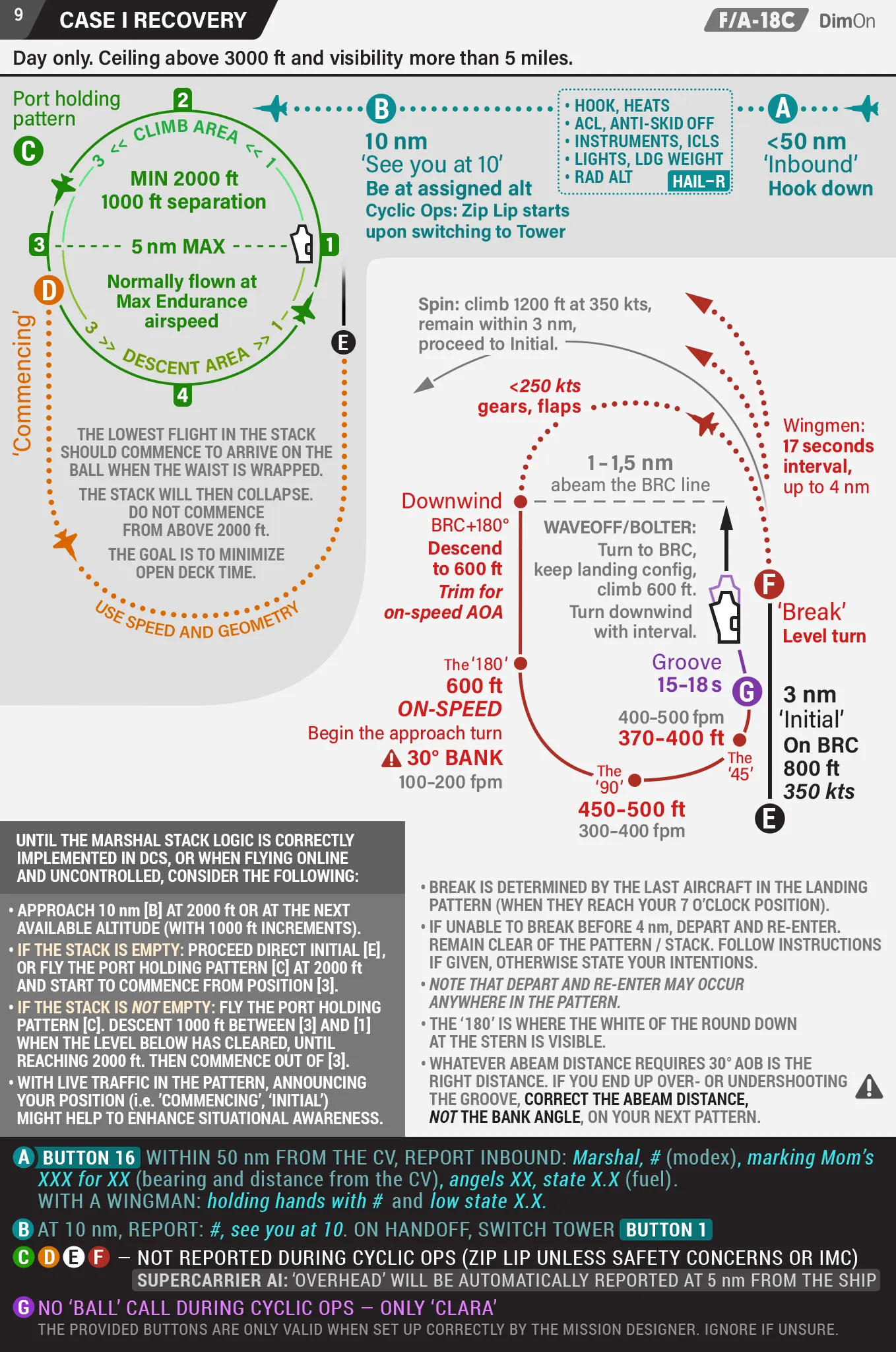
Section titled “Case I”Case I is the good-weather, daytime recovery: ceiling at or above 3,000 feet and visibility of 5+ nautical miles. It is a visual pattern you will fly most often on a clear day.
1. You will need to work through HAIL-R, and prep the flight for the Marshall call between 80-60NM2. Grab fuel states for -2, -3, and -4 (if flying with wingmen), and use the lowest for the Marshall call. Make that call before 60NM from Mother.3. Set the boat into recovery using the F10 nested menu before 80NM to avoid delays. (\ -> Other -> Airboss -> Kneeboard -> Skipper -> Start Case I)4. Use "Set Section" in the Airboss menu to register for grading—this includes bolters/go-arounds, and keeps you from having to fumble with "Emergency Landing."5. If you are solo simply tune BTN 16 for marshall and via Airboss menu request marshall6. Enter the stack at 2,000 ft (or your assigned altitude by airboss)7. Be at your assigned angels before 10NM, flying at 250 KIAS. If dumping fuel, enter at 6K to dump; if not, you can go straight to 2K.8. "Request Charlie" via Airboss menu when ready9. After you break over the boat grading begins in the down wind so stay exactly at 600 FT10. Turn left exactly when you see the round down, or you will get an LIG (Long in Groove) grade and this will hurt your final grade immensely